How to Use the Browser Extension?
AI Short supports 18 mainstream languages, and the extension language is set automatically based on your browser environment. You can also change it manually on the settings page.
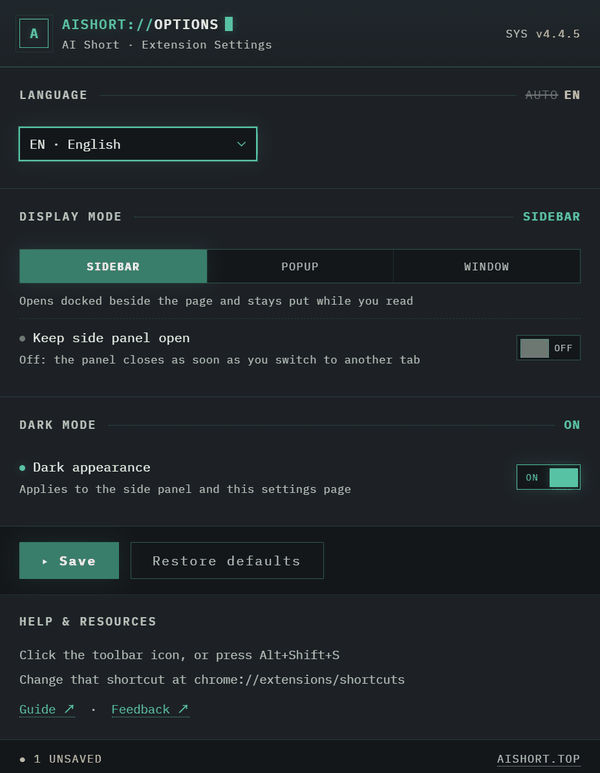
Display Mode
The extension supports three display modes — pick the one that fits your workflow:
- Sidebar mode: Opens in the browser sidebar, side-by-side with the web page — great for browsing prompts while looking at an AI chat page
- Popup mode: Click the extension icon to open a small popup — quick to glance at and close, doesn't take up screen space
- Window mode: Opens in a separate floating window — drag it to a second monitor or position it independently
Keep Sidebar Open
When this option is enabled, the sidebar stays open as you switch browser tabs — handy for continuous use.
Dark Mode
The extension supports dark mode. Enable "Dark Mode" on the settings page to switch the interface to a dark appearance.

Hotkey Activation
Use the Alt+Shift+S shortcut to activate the extension directly (Control+Shift+S on macOS); on Firefox, Alt+Shift+D toggles the native sidebar.
Shortcuts can be customised at chrome://extensions/shortcuts (on Firefox: about:addons → gear icon → Manage Extension Shortcuts).